
Is CANtrace compatible with Kvaser devices?

Yes, CANtrace is fully compatible with Kvaser CAN interfaces. This professional CAN bus analysis software works seamlessly with Kvaser’s extensive range of hardware, including Leaf Light, Leaf Professional, Memorator, and other Kvaser CAN interfaces. The integration is straightforward, requiring only proper driver installation and configuration. CANtrace leverages Kvaser’s reliable hardware to provide comprehensive CAN network monitoring, logging, and analysis capabilities, making it an excellent combination for automotive, industrial, and embedded systems engineers working with CAN networks.
Understanding CANtrace and its capabilities
CANtrace is a powerful professional software tool designed specifically for Controller Area Network (CAN) bus analysis and diagnostics. Developed by TK Engineering, this sophisticated analysis platform has evolved over many years to meet the demanding needs of engineers working with CAN-based systems in automotive, industrial automation, and embedded applications.
At its core, CANtrace provides a comprehensive set of features for monitoring, recording, and analyzing CAN traffic. These capabilities include real-time data visualization, advanced filtering, message decoding, and statistical analysis of network performance. The software supports modern protocols including standard CAN and the higher-bandwidth CAN FD specification.
What sets CANtrace apart in the CAN diagnostic ecosystem is its balance of professional capabilities with an intuitive user interface. While competing tools like Vector’s offerings may be more common in certain industries, CANtrace provides excellent value for organizations needing robust CAN analysis without unnecessary complexity.
What is CANtrace and how does it analyze CAN networks?
CANtrace is a specialized CAN bus Analyzer software that captures, displays, and interprets CAN messages transmitted between electronic control units (ECUs) in a network. The software presents a clean, functional interface that organizes CAN data in logical views, making it easier for engineers to understand complex network communications.
The analysis process begins with CANtrace connecting to a CAN network through compatible hardware interfaces like Kvaser devices. Once connected, it can:
- Monitor real-time CAN traffic with customizable display formats
- Record message traces for later analysis and troubleshooting
- Filter specific messages or IDs to focus on relevant data
- Decode raw CAN messages using imported database files (DBC)
- Generate signal graphs showing value changes over time
- Perform statistical analysis of bus load, message frequencies, and timing
CANtrace’s data logging capabilities are particularly valuable for troubleshooting intermittent issues. Engineers can record hours or days of CAN traffic and then use the software’s analytical tools to identify patterns or anomalies. The software also supports automated testing through its scripting functionality, allowing for repeatable validation procedures.
Is CANtrace compatible with Kvaser devices?
Yes, CANtrace is fully compatible with the complete range of Kvaser CAN interfaces. This compatibility extends across Kvaser’s diverse product lineup, from basic USB interfaces like the Leaf Light to advanced devices such as the Memorator Pro and Kvaser Eagle.
The integration between CANtrace and Kvaser hardware is particularly robust because both systems are designed with professional applications in mind. Specific Kvaser interfaces supported include:
- Kvaser Leaf Light and Light HS (entry-level USB interfaces)
- Kvaser Leaf Professional (higher performance USB interface)
- Kvaser Memorator series (standalone loggers with USB connectivity)
- Kvaser Eagle (Ethernet-based interfaces)
- Kvaser BlackBird (wireless CAN interfaces)
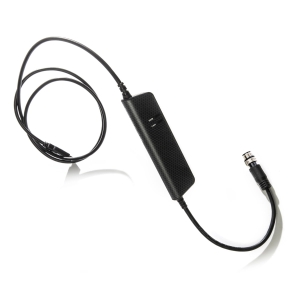
For proper operation, users must install the Kvaser drivers (typically the Kvaser CANlib) before connecting CANtrace to the interface. Configuration within CANtrace is straightforward – users simply select the detected Kvaser device from the hardware setup menu and configure parameters like bitrate and sampling points to match their CAN network.
The combination of CANtrace software with Kvaser hardware creates a powerful yet cost-effective solution for CAN analysis. For real-world examples of this integration in action, we encourage you to explore our case study section.
How do you activate or update a CANtrace license?
Activating or updating a CANtrace license follows a straightforward process designed to get engineers working quickly. The software uses a flexible licensing system that accommodates both evaluation and full professional use.
For new license activation:
- Download and install the CANtrace software from the official website
- Launch the application, which will initially run in trial mode
- Navigate to Help → License Manager in the main menu
- Enter your license key in the provided field
- Select the activation method (online is fastest if available)
- Complete the activation process by following the on-screen prompts
For license updates or renewals, the process is similar but begins with accessing the License Manager from an already installed copy of CANtrace. The software supports several licensing options, including:
- Trial licenses (typically 30 days with full functionality)
- Node-locked licenses (tied to a specific computer)
- Floating licenses (shared across a network)
- Temporary licenses (for project-based work)
License upgrades, such as moving from a basic to professional edition, can be performed without reinstalling the software. Simply input the new license key through the License Manager, and the additional features will become available immediately.
What advanced features does CANtrace offer for CAN analysis?
CANtrace provides a comprehensive suite of advanced capabilities that extend well beyond basic CAN message monitoring. These premium features make it suitable for sophisticated engineering tasks and complex diagnostic scenarios.
One standout feature is full CAN FD (Flexible Data-rate) support, allowing engineers to work with the newer, higher-bandwidth protocol that’s becoming increasingly common in automotive and industrial applications. CANtrace handles both standard CAN and CAN FD seamlessly in the same interface.
Protocol-specific decoding is another powerful capability, with built-in support for:
- J1939 (heavy vehicle standard)
- CANopen (industrial automation standard)
- NMEA 2000 (marine electronics)
- Generic OBD-II diagnostic protocols
For complex analysis tasks, CANtrace offers advanced filtering options that can isolate specific message patterns or signal conditions. This is complemented by custom scripting capabilities that allow automation of testing procedures or creation of specialized analysis tools within the CANtrace environment.
Database integration is particularly valuable, with CANtrace supporting industry-standard DBC files that define signal layouts within CAN messages. This allows the software to automatically decode raw hexadecimal data into meaningful engineering values with proper units and scaling.
Key takeaways about CANtrace and Kvaser integration
The integration between CANtrace software and Kvaser hardware creates a powerful ecosystem for CAN bus analysis that addresses the needs of most engineering teams. This combination delivers reliability, ease of use, and comprehensive analytical capabilities.
Compatibility is extensive across the entire Kvaser product line, from entry-level USB devices to advanced industrial interfaces. This flexibility allows organizations to select the appropriate hardware for their specific requirements while maintaining a consistent software experience.
The licensing structure provides pathways for different usage scenarios, from initial evaluation through to enterprise-wide deployment. The straightforward activation process minimizes downtime and administrative overhead.
For engineers working with CAN networks, the CANtrace-Kvaser combination offers several key advantages:
- Intuitive interface that balances power with usability
- Comprehensive protocol support including CAN FD and J1939
- Robust data logging and analysis capabilities
- Reliable hardware connectivity through quality Kvaser interfaces
- Cost-effective solution compared to some competitors
Whether debugging a complex automotive network, developing industrial control systems, or monitoring machine communications, CANtrace with Kvaser hardware provides the tools needed to understand and optimize CAN-based systems effectively.