
Is CANtrace a good alternative to Vector tools?

CANtrace is a cost-effective alternative to Vector tools for CAN bus analysis and monitoring. It offers comprehensive features including CAN FD support, J1939 protocol decoding, and advanced filtering capabilities at a significantly lower price point than Vector solutions. While Vector tools are considered industry standards with broader protocol support, CANtrace provides excellent value with an intuitive interface, robust data logging capabilities, and seamless integration with Kvaser hardware interfaces. For engineers and developers who need reliable CAN analysis without the premium price tag, CANtrace delivers a capable and accessible solution with flexible licensing options.
What is CANtrace and how does it compare to Vector tools?
CANtrace is a specialized CAN bus Analyzer software designed for monitoring, analyzing, and debugging CAN networks in automotive, industrial, and embedded systems. It serves as a direct alternative to the more widely known Vector tools but with different pricing and feature considerations.
When comparing CANtrace to Vector tools, the most notable difference is the cost structure. Vector’s solutions typically come with a premium price tag reflecting their market position, while CANtrace offers comparable core functionality at a significantly lower investment. This makes CANtrace particularly attractive for smaller teams, educational institutions, and companies with budget constraints.
Interface design is another point of distinction. CANtrace features a streamlined, user-friendly interface focused specifically on CAN analysis tasks. Vector tools often present a more complex interface with additional protocols and functionality, which can be either an advantage or disadvantage depending on your specific requirements.
Performance-wise, both solutions handle basic CAN analysis effectively, but Vector typically offers broader protocol support beyond CAN. However, CANtrace excels in its focused approach, providing all essential CAN monitoring capabilities without unnecessary complexity. The software delivers excellent response times and reliable performance for dedicated CAN bus analysis tasks.
What features and capabilities does CANtrace offer for CAN analysis?
CANtrace provides a comprehensive suite of features tailored specifically for CAN bus analysis and monitoring. At its core, the software offers complete CAN FD support, allowing engineers to work with both traditional CAN and the newer, faster CAN FD protocol with data rates up to 8 Mbps.
J1939 protocol decoding is another significant capability, essential for those working with heavy vehicles, agricultural machinery, and industrial equipment. The software automatically interprets J1939 messages, displaying them in human-readable format with parameter names, values, and units rather than raw hexadecimal data.
For data collection and analysis, CANtrace includes robust logging capabilities that allow continuous recording of CAN traffic to disk for later analysis. This feature supports both triggered logging based on specific events and scheduled logging for automated test scenarios.
The filtering options are particularly sophisticated, enabling users to isolate specific messages by ID, content, or timing characteristics. This functionality is crucial when troubleshooting complex systems with high message volumes.
Visualization tools round out the feature set, with graphing capabilities that allow real-time plotting of signal values, making it easier to identify trends and anomalies in CAN data. Engineers working on complex systems might find our case study examples particularly helpful in understanding how these features solve real-world problems.
How does CANtrace work with different hardware interfaces?
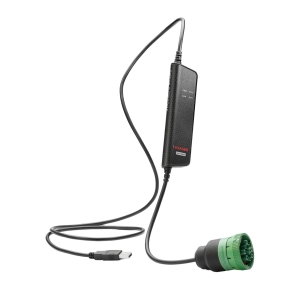
CANtrace is designed to work seamlessly with Kvaser hardware interfaces, offering plug-and-play functionality that minimizes setup time. This Kvaser compatibility spans across the entire range of Kvaser devices, including USB, PCIe, and Ethernet-based interfaces, providing flexibility for different testing environments.
The connection process is straightforward: after installing the CANtrace software, users simply connect their Kvaser device to the computer and to the CAN network. CANtrace automatically detects compatible hardware upon launch, allowing users to select their device from a dropdown menu and configure parameters such as bit rate and termination settings.
For more complex setups, CANtrace supports multi-channel configurations, enabling simultaneous monitoring of several CAN networks. This is particularly valuable for systems with multiple interconnected CAN buses or when comparing messages across different networks.
While Kvaser hardware offers the most seamless integration, CANtrace can also work with other hardware interfaces through adapter layers, though this may require additional configuration. The software’s hardware abstraction approach means that analysis results remain consistent regardless of the specific interface used, ensuring reliability across different testing setups.
What are the licensing options for CANtrace?
CANtrace offers flexible licensing options designed to accommodate different user needs and budgets. The licensing model includes perpetual licenses with optional maintenance agreements, contrasting with Vector’s approach which often emphasizes subscription-based access.
For those wanting to evaluate the software, CANtrace provides a fully functional trial version with a 30-day usage period. This trial includes all features but places limitations on continuous runtime and data export functionality. It’s an excellent way to verify compatibility with your hardware setup and ensure the software meets your requirements before purchase.
The activation process is user-friendly, requiring a simple license key entry after purchase. This activates all features permanently on the designated machine. For organizations with multiple users, floating license options are available, allowing the software to be shared across a team while controlling the number of simultaneous users.
Updates and maintenance follow a transparent approach, with major version updates typically requiring a maintenance agreement, while minor updates and bug fixes are provided free of charge to all license holders. This contrasts favorably with Vector’s more complex update policies, which may require ongoing subscription payments to access the latest features.
What do users say about CANtrace versus Vector tools?
User feedback consistently highlights several key differences between CANtrace and Vector tools. Engineers frequently mention CANtrace’s value proposition, noting that it provides the essential functionality they need without the substantial investment required for Vector’s offerings.
Users with experience in both systems often praise CANtrace’s focused approach and shorter learning curve. The software’s intuitive interface allows new users to become productive quickly, whereas Vector tools typically require more extensive training due to their broader feature set and more complex interface.
Performance comparisons generally indicate that for specific CAN analysis tasks, CANtrace delivers comparable results to Vector tools. Users report reliable operation even in demanding environments with high message traffic. However, engineers working across multiple protocols beyond CAN sometimes note Vector’s advantage in supporting a wider range of automotive and industrial communication standards.
Support experience is another area frequently mentioned in user feedback. Despite being a smaller company, CANtrace users often report more personalized support experiences with faster response times compared to larger providers like Vector. This can be particularly valuable during critical development or troubleshooting phases when timely assistance makes a significant difference.
Overall, engineers tend to select CANtrace when they need focused CAN analysis capabilities with good value, while choosing Vector when they require broader protocol support or when working within organizations that have standardized on Vector tools.