
How to Calibrate Your WCS-10 for Peak Performance
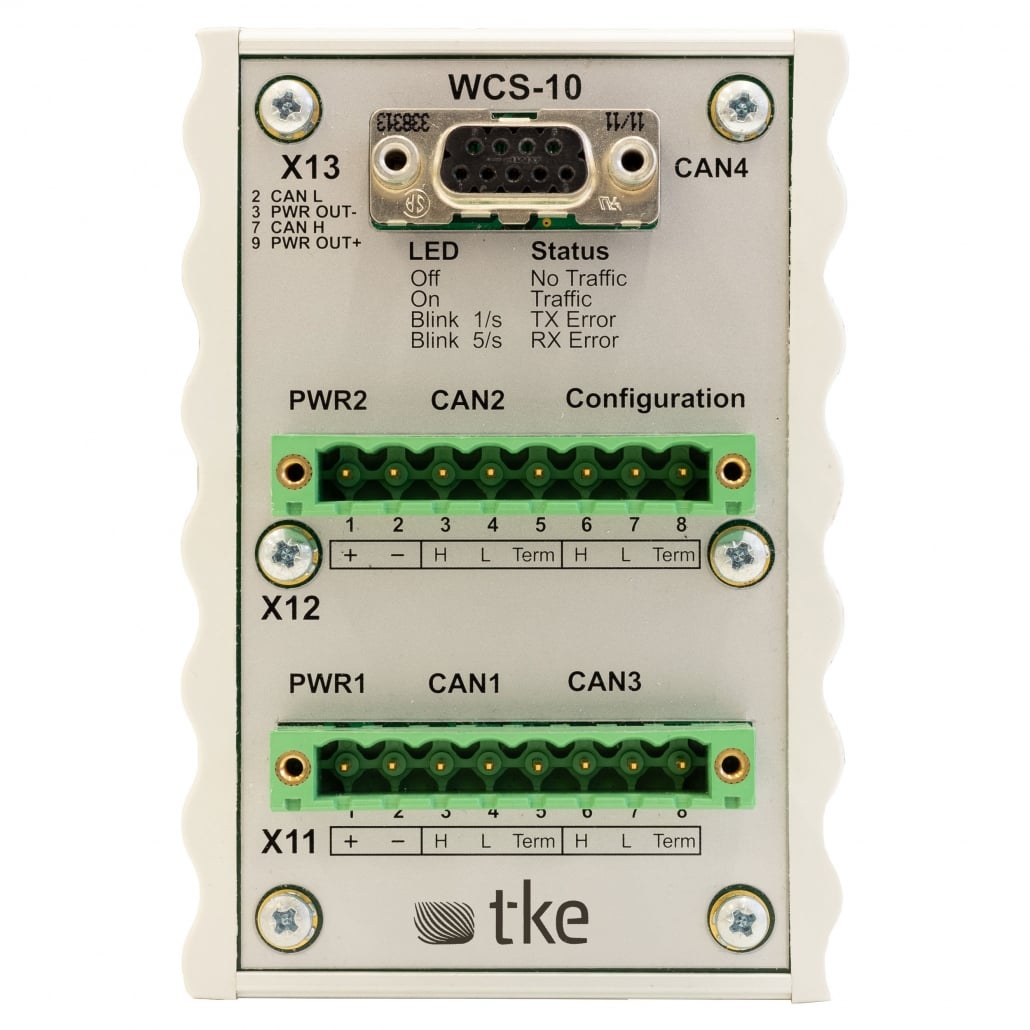
Proper calibration of your WCS-10 CAN switch bridge is essential for ensuring optimal communication across your marine vessel’s network systems. The process involves adjusting configuration settings, verifying connection parameters, and optimising signal integrity to maintain reliable data transmission. When correctly calibrated, the WCS-10 delivers enhanced system stability, reduced signal errors, and improved longevity of your entire CAN-bus network infrastructure. This comprehensive guide walks you through the complete calibration procedure to achieve peak performance.
Understanding the importance of WCS-10 calibration
The WCS-10 is a marine-certified CAN switch bridge that serves as a critical component in vessel communication networks. Proper calibration directly impacts the reliability and performance of your entire system by ensuring accurate data transmission between connected devices.
Regular calibration prevents common issues such as signal degradation, communication errors, and network failures that can lead to costly system downtime. For marine applications where reliability is paramount, maintaining optimal WCS-10 settings ensures your vessel’s vital systems communicate effectively even in challenging conditions.
The benefits of properly calibrated WCS-10 units extend beyond basic functionality:
- Enhanced data transmission speed and reliability
- Reduced network latency and packet loss
- Improved fault tolerance and error recovery
- Extended hardware lifespan through optimised operations
- Better compatibility with other CAN-bus devices
By understanding the calibration process, you’ll ensure your marine CAN-bus technology operates at peak efficiency, supporting critical vessel functions without interruption.
What equipment do you need for WCS-10 calibration?
Successful calibration of your WCS-10 requires specific tools and software to accurately measure, adjust and verify the device’s performance parameters. Having the right equipment on hand ensures a smooth and effective calibration process.
The essential equipment list includes:
- Diagnostic interface – A USB-to-CAN adapter compatible with the WCS-10 for direct communication between your computer and the device
- Configuration software – The latest version of the WCS-10 configuration utility
- Connection cables – High-quality shielded CAN cables with appropriate connectors
- Terminal resistors – 120-ohm resistors for proper bus termination
- Digital multimeter – For verifying voltage levels and resistance measurements
- Power supply – Stable power source that meets the WCS-10 specifications
- CAN bus analyser (optional) – For advanced troubleshooting and signal verification
Additionally, ensure you have the latest firmware update for your WCS-10 device, as calibration procedures may vary slightly between versions. Having all necessary equipment prepared beforehand prevents interruptions during the calibration process, saving time and ensuring accurate results.
How do you prepare your system for calibration?
Proper preparation is crucial for accurate WCS-10 calibration results. Before beginning the calibration process, you must ensure that your system environment and connections are optimally configured to prevent external factors from influencing calibration values.
Follow these preparation steps:
- Power down all connected systems and devices to prevent data transmission during setup
- Inspect all physical connections for damage, corrosion or loose fittings
- Clean connection points with appropriate electrical contact cleaner if necessary
- Verify that your power supply is stable and providing the correct voltage
- Ensure the calibration environment matches typical operating conditions for temperature and humidity
- Isolate the WCS-10 from other network traffic that might interfere with calibration readings
- Document current configuration settings as a backup reference
- Check that terminal resistors are properly installed at both ends of the CAN bus segment
Additionally, review the network topology to confirm that the WCS-10 is positioned optimally within your system architecture. Proper preparation minimises the risk of calibration errors and ensures the device will perform reliably under actual operating conditions once reintegrated into your vessel’s network.
What are the step-by-step calibration procedures?
Calibrating your WCS-10 requires following a precise sequence of steps to ensure optimal performance. This methodical approach guarantees that all parameters are properly adjusted for your specific marine application.
Begin by connecting your diagnostic interface to the WCS-10 and launching the configuration software. Once connected:
- Access the device configuration panel and select “Calibration Mode” from the main menu
- Verify current firmware version and update if necessary before proceeding
- Set the appropriate CAN bus speed parameters (typically 250kbps for marine applications)
- Adjust the termination resistance settings to match your network configuration
- Calibrate the voltage reference points using the “Auto-Calibrate” function or manually adjust if specific values are required
- Configure packet filtering parameters to optimise network traffic management
- Fine-tune signal thresholds for noise immunity in marine environments
- Set appropriate error handling and recovery parameters
- Configure port redundancy and failover settings if applicable
- Verify all settings by performing a diagnostic test that measures signal integrity and response times
- Save the configuration to persistent memory using the “Store Settings” function
After completing these steps, perform a verification test by monitoring actual data transmission for several minutes to ensure stability. The calibration software should provide real-time feedback on signal quality, error rates, and transmission efficiency to confirm successful calibration.
How can you troubleshoot common calibration issues?
Even with careful preparation, you may encounter challenges during the WCS-10 calibration process. Identifying and resolving these issues quickly ensures your CAN switch bridge operates at peak performance.
Here are solutions for the most common calibration problems:
- Connection failures – If the configuration software cannot detect your WCS-10, check physical connections, power supply, and try a different USB port. Verify driver installation for your diagnostic interface.
- Calibration parameter drift – When calibration values won’t stabilise, this often indicates electrical interference or grounding issues. Ensure proper shielding and verify ground connections throughout the system.
- Configuration reset issues – If settings don’t persist after power cycling, the device’s non-volatile memory may be compromised. Try updating firmware or contact support if the problem persists.
- Network communication errors – High error rates after calibration suggest improper bus termination or speed settings. Verify that termination resistors are correctly installed and that all devices on the network support the configured bit rate.
- Signal integrity problems – Degraded signal quality may indicate cable damage or excessive bus length. Inspect cables for damage and ensure your network topology adheres to CAN-bus specifications.
For persistent issues, creating a diagnostic log through the configuration software can provide valuable information for technical support. The log captures detailed signal metrics and error patterns that can identify subtle configuration or hardware problems affecting calibration results.
Key takeaways for maintaining optimal WCS-10 performance
Maintaining peak performance of your WCS-10 requires ongoing attention beyond the initial calibration process. Implementing regular maintenance practices ensures consistent reliability and longevity of your marine CAN-bus system.
To preserve optimal performance:
- Schedule regular calibration checks quarterly or after any significant system changes
- Monitor error logs periodically to identify emerging issues before they cause failures
- Keep configuration software and firmware updated to access the latest features and fixes
- Document all calibration settings and changes for future reference
- Protect connections from marine environment corrosion with appropriate sealing and maintenance
- Perform annual physical inspections of all CAN network components and cables
- Test backup and redundancy systems regularly to ensure failover capabilities
Remember that environmental factors such as temperature fluctuations and vibration can affect calibration over time. Vessels operating in particularly harsh conditions may benefit from more frequent calibration checks to maintain optimal performance.
By following these guidelines, you’ll ensure your WCS-10 CAN switch bridge continues to provide reliable communication across your vessel’s network systems, supporting critical operations with minimal downtime and maximum efficiency. Our expertise in fieldbus solutions and CAN-bus technology is always available to assist with optimisation needs for your specific application.
Interested in real-world automation solutions?
Browse our case studies to discover how we support safe and efficient operations through smart control and networking systems