
What memory options are available with Influx loggers?
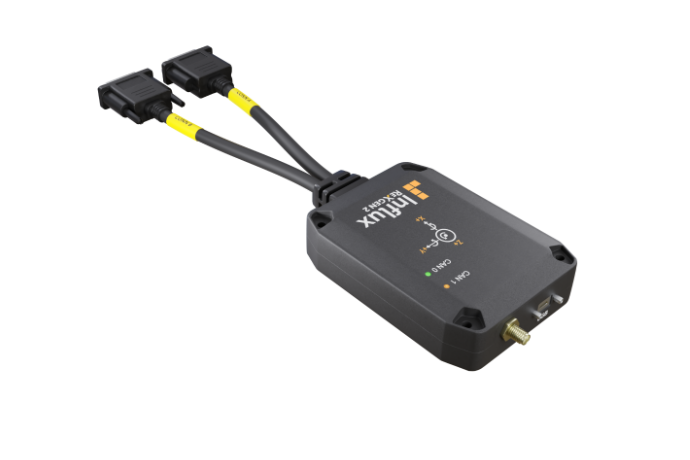
Influx data loggers offer multiple memory configuration options to suit diverse logging requirements in professional vehicle and industrial testing environments. Standard Influx loggers typically come with built-in flash memory ranging from 4GB to 32GB, while the advanced ReXgen models offer expandable storage up to 512GB through additional SD card slots and external USB storage support. These flexible memory options enable everything from short diagnostic sessions to extended data collection campaigns, with trigger-based recording functionality that optimizes storage usage by capturing only relevant data based on predetermined conditions.
Understanding Influx data loggers and their importance
Influx data loggers are specialised tools designed to capture, record and analyse CAN-bus data in vehicle and industrial systems. These sophisticated devices serve as the critical link between complex electronic systems and the diagnostic insights engineers need to optimise performance, troubleshoot issues, and validate designs.
The memory capabilities of these loggers play a fundamental role in their effectiveness. Without sufficient and properly configured storage, even the most advanced logger would fail to capture the comprehensive data needed for thorough analysis. Memory options determine how much data can be collected, how long recording sessions can last, and how efficiently the system utilises available storage.
In professional testing applications, memory considerations become particularly crucial when dealing with high-bandwidth CAN networks, multiple channels, or extended testing periods. Engineers rely on these devices to capture every relevant data point across numerous testing scenarios, making memory configuration a key factor in successful data collection strategies.
What memory options are available with Influx loggers?
Influx loggers offer a range of memory configurations designed to accommodate various logging requirements and budgets. The standard memory options typically start with built-in flash storage ranging from 4GB to 32GB, providing sufficient capacity for most routine diagnostic sessions and shorter testing periods.
For more demanding applications, advanced models in the Influx lineup, particularly the ReXgen series, offer expanded memory capabilities:
- Internal flash memory (4GB-32GB): Non-removable, high-speed storage for system operations and primary logging
- SD card slots: Support for high-capacity SD cards (up to 256GB) for extended logging sessions
- USB storage support: Compatibility with external USB drives up to 512GB for maximum capacity expansion
- Cloud storage integration: Select models offer connectivity options for real-time data uploading to cloud storage systems
These memory options can be utilised individually or in combination, creating flexible configurations that adapt to specific project requirements. For instance, engineers might use internal memory for critical parameters while directing larger datasets to removable storage for easier data transfer and analysis.
The ReXgen platform, in particular, excels at memory management through its sophisticated file system that optimises data storage and retrieval processes, reducing file fragmentation and improving overall logging performance even during intensive recording sessions.
How does trigger-based logging affect memory usage?
Trigger-based logging significantly optimises memory usage by recording data only when specific predefined conditions are met, rather than continuously. This intelligent approach to data capture can extend effective recording times by 5-10 times compared to continuous logging, making it a powerful feature for maximising available storage capacity.
When configured properly, trigger-based recording allows Influx loggers to:
- Capture data only during relevant events (e.g., when specific CAN messages appear or parameter thresholds are crossed)
- Implement pre-trigger and post-trigger recording windows to ensure context is maintained
- Use circular buffer techniques to constantly monitor systems while only committing important data to permanent storage
- Create conditional recording rules based on multiple parameters for sophisticated data capture scenarios
For example, when testing a vehicle’s braking system, engineers might configure triggers to start recording when brake pressure exceeds a certain threshold or when ABS activation signals appear on the CAN bus. This approach ensures all relevant data surrounding braking events is captured while minimising storage of less valuable data collected during regular driving.
By implementing strategic trigger-based logging, users can effectively extend their logging duration from hours to days or even weeks on the same memory capacity, while simultaneously improving the signal-to-noise ratio in their collected datasets.
What are the differences between internal and external storage options?
Internal and external storage options for Influx loggers offer distinct advantages and limitations that make them suitable for different usage scenarios. Understanding these differences helps engineers select the optimal configuration for their specific logging requirements.
Internal storage typically consists of built-in flash memory that offers:
- Higher reliability with protection against physical disconnection or environmental factors
- Faster write speeds for high-bandwidth logging applications
- Seamless integration with the logger’s operating system and firmware
- Enhanced data security with built-in encryption options
However, internal storage is limited by its fixed capacity and requires connecting the logger to a computer for data transfer.
In contrast, external storage options such as SD cards and USB drives provide:
- Easy physical transfer of recorded data between devices
- Simple capacity expansion without hardware modifications
- Ability to swap storage media for continuous logging beyond capacity limitations
- Cost-effective scaling of storage capacity as project needs evolve
Many professional applications benefit from hybrid approaches. For instance, using internal memory for system operations and critical logging while directing bulk data to external media combines the reliability of internal storage with the flexibility and capacity of removable media.
When working with Kvaser hardware or other industrial CAN interfaces, compatibility with both storage types ensures seamless integration regardless of the chosen memory configuration.
How to choose the right memory configuration for your logging needs
Selecting the optimal memory configuration for your Influx logger requires careful consideration of several key factors related to your specific application requirements. Begin by calculating your data throughput needs based on the number of CAN channels, sampling rates, and message frequency to determine your baseline storage requirements.
Consider these critical parameters when making your decision:
- Logging duration: Short diagnostic sessions may require only 4-8GB, while long-term fleet monitoring might need 128GB+
- Data complexity: High-channel-count applications with numerous signals demand greater capacity
- Accessibility requirements: Determine if you need hot-swappable media for continuous operation
- Environmental conditions: Extreme temperatures or vibration may favour internal memory for reliability
- Security considerations: Sensitive data might require encrypted internal storage
- Budget constraints: Balance initial costs against expandability needs
For projects requiring integration with other systems, ensure your memory configuration supports compatible file systems and data transfer protocols. When working alongside specialized hardware, verify that your chosen memory solution maintains full compatibility with your existing infrastructure.
Consider reviewing a relevant Case study to gain insights from similar implementations. This practical perspective can provide valuable guidance on memory requirements for comparable applications.
Key takeaways on Influx logger memory capabilities
The memory options available with Influx loggers provide flexible, scalable solutions for professional data logging applications. When selecting and configuring these systems, remember these essential points:
- Scalable capacity: From basic 4GB configurations to enterprise-grade 512GB setups, Influx loggers can scale to meet diverse project requirements
- Trigger-based optimization: Intelligent recording strategies can multiply effective logging durations by selectively capturing only relevant data
- Hybrid storage approaches: Combining internal reliability with external flexibility offers the best balance for most applications
- Application-specific configuration: Match your memory setup to your specific industry, vehicle type, and testing protocols
- Future-proofing: Select systems with expandable memory options to accommodate growing data requirements
For optimal results, reassess memory needs periodically as projects evolve. Data requirements typically increase over time as testing becomes more sophisticated or additional parameters are monitored. The modular design of Influx logging systems, particularly the ReXgen platform, enables straightforward capacity expansion without requiring complete system replacement.
By thoughtfully configuring memory options based on your specific logging requirements, you can ensure your data collection infrastructure remains both efficient and effective, capturing all necessary information while optimizing resource utilization and simplifying data management workflows.