
How to Upgrade Your System with a CAN Switch
 MARIN
MARINUpgrading your system with a CAN switch involves replacing outdated network components with modern alternatives to enhance communication efficiency in Controller Area Networks. This process typically requires assessing compatibility requirements, following proper installation procedures, and configuring the new switch to work with existing systems. A successful CAN switch upgrade can significantly improve data throughput, reduce latency, enhance reliability, and extend the lifespan of your entire network infrastructure while enabling advanced features not supported by older hardware.
What is a CAN switch and why might you need an upgrade?
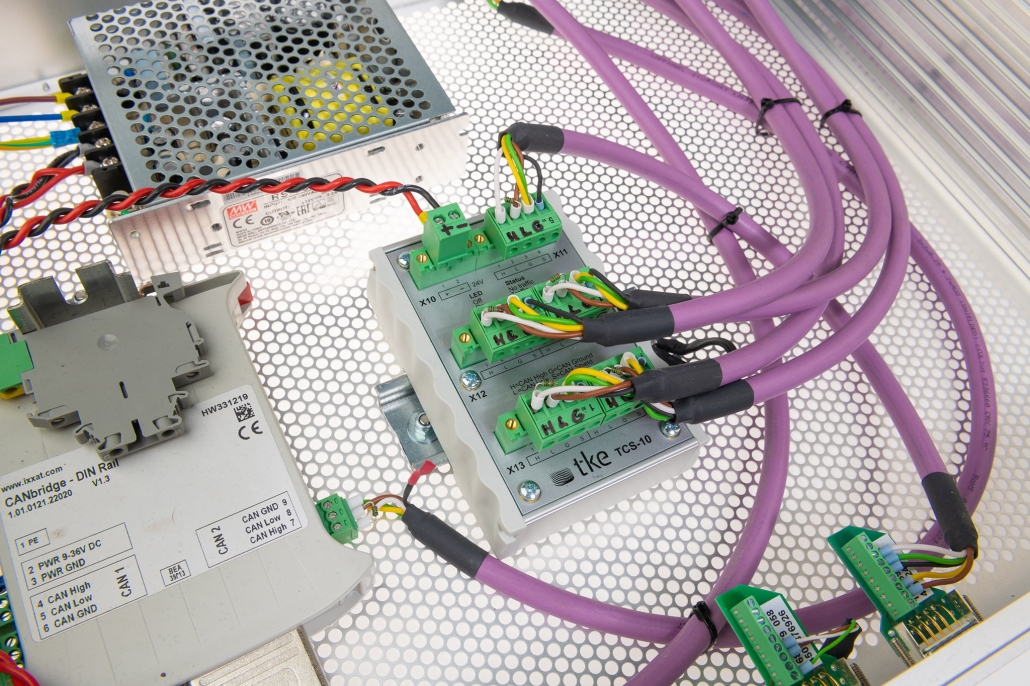
A CAN switch is a specialized networking device that intelligently directs message traffic between different segments of a Controller Area Network (CAN-bus) system. Unlike basic hubs that broadcast all messages to all connected devices, CAN switches selectively forward data packets only to their intended destinations, significantly improving network efficiency.
You may need to upgrade your CAN switch when your existing network shows signs of performance degradation. These indicators include increased message latency, communication errors, packet collisions, or bottlenecks during peak data transmission periods. Older systems often struggle with modern bandwidth requirements, especially as you add more nodes to your network.
Legacy CAN systems typically have limitations in several critical areas:
- Lower data transmission rates (125-500 Kbps vs 1 Mbps or higher in modern systems)
- Limited filtering capabilities that allow unnecessary traffic to congest the network
- Fewer ports, restricting network expansion
- Minimal diagnostic features, making troubleshooting difficult
- Lack of support for newer CAN protocols like CAN FD (Flexible Data-Rate)
When your industrial communication network begins to slow down or you need to integrate new devices that require higher performance, upgrading to a modern CAN switch becomes essential rather than optional. Contemporary fieldbus solutions provide enhanced management capabilities, greater throughput, and improved reliability that directly translate to operational efficiency.
What are the compatibility requirements for CAN switch upgrades?
Ensuring compatibility is crucial when upgrading your CAN switch to avoid integration issues and unexpected downtime. The primary compatibility requirements fall into four main categories: protocol support, electrical specifications, physical connections, and system architecture considerations.
For protocol compatibility, verify that your new CAN switch supports all the protocols used in your existing network. This may include standard CAN 2.0A/B, CAN FD, DeviceNet, CANopen, J1939, or proprietary protocols specific to your industry. Mixing incompatible protocols can result in communication failures or data corruption.
Electrical specifications that must match include:
- Voltage requirements – Typically 5V, 12V, or 24V depending on your system
- Current capacity – Ensuring the new switch can handle the power needs of connected devices
- Signal levels – Compatible with your existing network’s electrical characteristics
- Termination resistances – Maintaining proper impedance matching
Physical connection compatibility encompasses connector types (DB9, terminal blocks, M12, etc.), pinout configurations, and cable specifications. Modern CAN switches often offer more connection options but must still interface correctly with your existing infrastructure.
System architecture considerations include:
- Maximum number of nodes supported
- Network topology limitations (star, line, or hybrid configurations)
- Maximum cable lengths between nodes
- Support for redundancy features if required
- Management interface compatibility (web-based, command-line, or software tools)
Before purchasing, create a detailed inventory of your current network specifications and ensure the new CAN-bus technology aligns with these requirements while providing the performance improvements you seek.
How do you install a new CAN switch in an existing system?
Installing a new CAN switch requires careful planning and execution to minimize system downtime and ensure proper functionality. Follow these systematic steps for a successful implementation:
Preparation phase:
- Document your existing network configuration, including node addresses, termination points, and communication parameters
- Back up all system configurations and relevant software
- Schedule the upgrade during a maintenance window to minimize operational impact
- Gather all necessary tools and components (cables, adapters, mounting hardware)
- Notify all stakeholders about the planned network changes
Safety procedures are essential before beginning physical installation:
- Power down all connected equipment following proper shutdown procedures
- Implement appropriate electrostatic discharge (ESD) protection measures
- Verify power is disconnected using appropriate testing equipment
- Follow all facility-specific safety protocols
For the physical installation:
- Mount the new CAN switch in an appropriate location that provides adequate ventilation and accessibility
- Label all cables before disconnecting them from the old switch
- Connect the network cables to the corresponding ports on the new switch
- Ensure proper termination at the ends of the CAN bus segments (typically 120Ω resistors)
- Connect power supplies and verify proper voltage before powering on
Configuration and testing are critical final steps:
- Apply the basic configuration to the new switch (IP address, subnet mask, etc., if applicable)
- Configure port settings, filtering rules, and priority handling according to your network requirements
- Power up the system in stages, beginning with the switch and then connected devices
- Verify communication between all nodes using diagnostic tools
- Test under various load conditions to ensure stability
- Document the new configuration for future reference
Monitoring the network for 24-48 hours after installation is recommended to catch any intermittent issues that might not appear during initial testing.
What benefits can you expect after upgrading to a modern CAN switch?
Upgrading to a modern CAN switch delivers substantial performance and functionality improvements that can transform your network’s capabilities. The most immediate benefit is enhanced network optimization through improved data throughput and reduced latency, allowing your system to handle more devices and higher message volumes without communication bottlenecks.
Reliability enhancements are particularly valuable in industrial environments where downtime is costly. Modern CAN switches offer:
- Advanced error detection and correction capabilities
- Automatic recovery from communication failures
- Built-in redundancy options to prevent single points of failure
- Robust operation in electrically noisy environments
- Extended temperature ranges for harsh conditions
Expanded capabilities unlock new possibilities for your network:
- Support for higher-speed protocols like CAN FD (up to 8 Mbps)
- More sophisticated message filtering and priority handling
- Advanced diagnostic tools for troubleshooting
- Detailed traffic statistics and performance monitoring
- Integration with modern management systems via SNMP or other protocols
Long-term operational benefits include reduced maintenance costs, extended system lifespan, and simplified network expansion. Modern switches typically consume less power while delivering higher performance, contributing to energy efficiency. Additionally, they often provide future-proofing through firmware update capabilities that can add features or address security vulnerabilities without hardware replacement.
The cumulative effect of these improvements is a more responsive, reliable, and capable industrial communication network that can adapt to evolving requirements while maintaining compatibility with your existing infrastructure.
Key takeaways for successful CAN switch upgrades
When planning your CAN switch upgrade, thorough preparation is the foundation for success. Begin with a comprehensive assessment of your current network requirements, performance bottlenecks, and future growth plans. This evaluation will guide your selection of appropriate hardware that addresses specific needs rather than unnecessary features.
Common pitfalls to avoid during the system upgrade process include:
- Underestimating compatibility requirements, especially with legacy equipment
- Insufficient documentation of the existing network configuration
- Inadequate testing before full deployment
- Overlooking termination requirements at network segment endpoints
- Failing to plan for adequate redundancy in critical systems
- Neglecting to train technical staff on new equipment operation
To maximize the value of your upgrade investment:
- Consider scalability needs for future expansion
- Evaluate total cost of ownership, not just purchase price
- Implement proper documentation and labeling systems
- Develop maintenance schedules for optimal performance
- Create backup configurations for quick recovery if needed
Professional support can significantly reduce implementation risks and accelerate deployment. Expert assistance with network design, component selection, installation, and configuration ensures your upgraded system performs optimally from day one. This approach often proves more cost-effective than addressing issues after implementation.
When properly planned and executed, a CAN switch upgrade delivers substantial returns through improved reliability, enhanced performance, and extended system lifespan—transforming your industrial communication infrastructure into a more capable and future-ready platform.
Interested in real-world automation solutions?
Browse our case studies to discover how we support safe and efficient operations through smart control and networking systems