
How do you set up trigger-based logging in Influx?
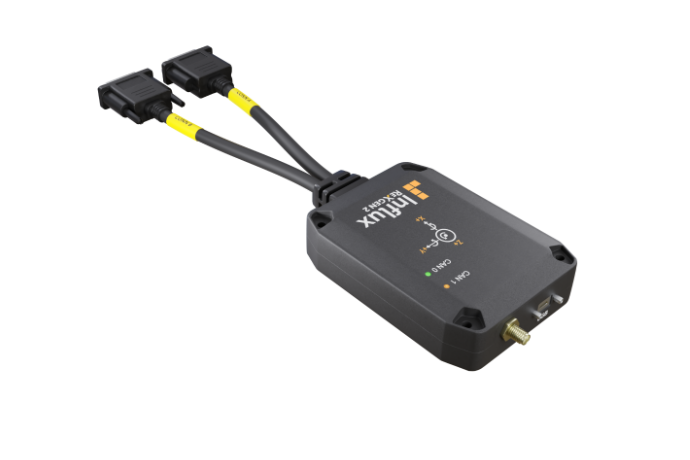
Trigger-based logging in Influx systems allows for intelligent data capture when specific conditions are met, ensuring efficient storage and targeted analysis. Setting up trigger-based logging involves configuring the Influx ReXgen logger through its interface, defining precise trigger conditions (such as signal thresholds or state changes), and establishing appropriate pre/post-trigger buffer settings. This approach is particularly valuable for CAN diagnostics in vehicle testing, enabling engineers to capture only the most relevant data when predetermined events occur, rather than continuously logging all available information.
Understanding trigger-based logging in Influx systems
Trigger-based logging is an advanced data collection method that records information only when specific predefined conditions are met. Unlike continuous logging that captures everything, trigger-based logging starts recording when a trigger event occurs, making it an intelligent and efficient approach to data collection.
In the context of Influx systems, trigger-based logging revolutionises how CAN-bus data is captured and analysed. The technology monitors various signals and parameters in real-time, waiting for specific events or threshold violations before initiating the recording process. This targeted approach is particularly valuable when investigating intermittent issues or specific operating conditions in vehicle testing environments.
The primary benefits of trigger-based logging include:
- Optimised storage utilisation by recording only relevant data
- Improved analysis efficiency by focusing on problem areas
- Enhanced ability to capture rare or intermittent events
- Reduced post-processing time for engineers and technicians
For professional testing applications, this functionality enables the identification of complex issues that might otherwise remain undetected in standard logging approaches.
What is the Influx ReXgen logging system?
The Influx ReXgen is a sophisticated data logging tool specifically designed for vehicle testing and CAN-bus diagnostics. This comprehensive system offers advanced capabilities for capturing, analysing, and storing CAN network data in automotive and industrial applications.
The ReXgen product line features various models with different specifications to meet diverse testing requirements. These loggers come with substantial memory options ranging from 2GB to 32GB, allowing for extensive data collection during long-term testing scenarios. The system supports multiple CAN channels, enabling simultaneous monitoring of different network segments.
Key features of the Influx ReXgen include:
- High-speed data acquisition at up to 1 Mbit/s
- Support for standard CAN and CAN FD protocols
- Configurable pre-trigger and post-trigger buffers
- Integrated GPS and IMU options for location and motion data
- Robust design for reliable operation in harsh environments
These capabilities make the ReXgen system particularly well-suited for fleet monitoring, long-term vehicle testing, and detailed CAN-bus diagnostics in both development and maintenance contexts.
ReXgen 2
How do you set up trigger-based logging in Influx?
Setting up trigger-based logging in Influx systems involves a systematic approach to configure the conditions that will initiate data recording. The process requires attention to detail but is straightforward with the right guidance.
To configure trigger-based logging in your Influx ReXgen system:
- Connect and initialise your Influx ReXgen logger to your computer and launch the configuration software
- Navigate to the trigger settings section in the interface
- Select the CAN channels you wish to monitor for trigger conditions
- Define your trigger parameters by specifying:
- Signal ID or message identifier
- Condition type (equals, greater than, less than, etc.)
- Threshold value that will activate the trigger
- Logical operators for complex triggers (AND/OR conditions)
- Configure pre-trigger and post-trigger buffer settings to capture data before and after the trigger event
- Set up trigger actions (start logging, mark event, send notification)
- Save your configuration to the logger
- Verify trigger operation through a test run
For example, in a vehicle testing scenario, you might configure a trigger to start logging when engine RPM exceeds 5000 AND coolant temperature is above 90°C, capturing data that helps analyse high-load operating conditions. Another practical application might involve triggering when specific error codes appear on the CAN bus, allowing for detailed investigation of fault conditions.
How does Influx integrate with Kvaser hardware?
Influx logging systems are designed to work seamlessly with Kvaser hardware, creating a powerful combination for comprehensive CAN-bus diagnostics and data collection. This integration enhances the capabilities of both systems and provides users with expanded functionality.
The integration process begins with the physical connection between the Influx logger and Kvaser interfaces. Most commonly, this involves connecting the Kvaser hardware to the CAN bus network and then linking it to the Influx logging system either directly or through an intermediate computer running the configuration software.
The compatibility extends to various Kvaser hardware options, including:
- Kvaser Leaf Light – for basic CAN diagnostics
- Kvaser Hybrid – for mixed CAN and LIN networks
- Kvaser Memorator – for standalone logging applications
- Kvaser Eagle – for high-performance multi-channel requirements
This integration supports multiple CAN protocols, including standard CAN 2.0A/B and CAN FD, enabling comprehensive data capture across different vehicle networks. The combined solution offers optimised data transfer rates and reliable performance, particularly in demanding environments where signal integrity is crucial.
What additional features enhance Influx logging capabilities?
Influx logging systems incorporate several complementary features that significantly enhance their data collection capabilities, making them comprehensive solutions for professional testing applications.
One of the most valuable additions is GPS/IMU support, which allows for precise geolocation and motion data to be synchronised with CAN bus information. This integration enables correlation between vehicle behaviour, geographical position, and network data, providing context that is invaluable for troubleshooting and performance analysis.
The support for industry-standard DBC format files further enhances functionality by allowing the system to decode raw CAN data into meaningful engineering values. This capability simplifies data interpretation and accelerates the analysis process, particularly when working with complex vehicle networks containing hundreds of signals.
Other notable features include:
- Sophisticated software tools for data visualisation and analysis
- Multiple export formats for compatibility with third-party analysis tools
- Remote access capabilities for distributed testing operations
- Secure data handling with encryption and access controls
- Automated report generation for streamlined workflows
These additional capabilities transform the Influx system from a simple logger into a comprehensive data acquisition and analysis platform, particularly suited for vehicle fleet monitoring and advanced testing applications.
Key takeaways for implementing trigger-based logging with Influx
When implementing trigger-based logging with Influx systems, several best practices can help ensure successful deployment and optimal results. Understanding these key points will streamline your setup process and maximise the benefits of this advanced logging approach.
First, carefully identify and define your trigger conditions based on your specific testing objectives. Well-defined triggers are essential for capturing relevant data while avoiding unnecessary storage usage. Consider combining multiple conditions using logical operators for more precise event capture in complex scenarios.
Balance your pre-trigger and post-trigger buffer settings to capture the complete event context. In most cases, allocating 20-30% of buffer capacity to pre-trigger data ensures you don’t miss crucial information leading up to the triggering event.
Common implementation challenges include:
- Overly sensitive triggers that activate too frequently
- Insufficient buffer settings that miss contextual data
- Complex trigger conditions that may conflict with each other
- Signal noise potentially causing false triggers
For detailed examples of successful implementations and industry-specific applications, review our Case study resources that demonstrate practical applications of trigger-based logging in various scenarios.
Regular testing and refinement of your trigger configurations will ensure your logging system continues to capture the most relevant data as your testing requirements evolve, maximising the effectiveness of your Influx logging solution in CAN-bus diagnostics and vehicle testing applications.